Resposta
Reset router to factory defaults
Hi,
I have a black router with the cable connectors at the bottom. Hub I think.
I have connected my PC via cable, and successfully got the log in screen.
However the username of home and password nosnet do not work to give me access. 😞
I am having networking problems (can't see myself and another server of the network), and need to check the set up. I also have no recollection of changing the password.
How can I reset the router to factory defaults, so that I can get in?
Regards
Ian
p.s. English answer please. My Portuguese is still rudimentary.
I have a black router with the cable connectors at the bottom. Hub I think.
I have connected my PC via cable, and successfully got the log in screen.
However the username of home and password nosnet do not work to give me access. 😞
I am having networking problems (can't see myself and another server of the network), and need to check the set up. I also have no recollection of changing the password.
How can I reset the router to factory defaults, so that I can get in?
Regards
Ian
p.s. English answer please. My Portuguese is still rudimentary.

Melhor resposta por Mário P.
Welcome to Forum NOS @IanH :D
In order to help you, please access the internal page of the Router using the RJ45 (Ehernet) cable.
To access the internal page you must go to the IP: 192.168.1.1, using the following authentication data:
Username: home
Passward: zonnet
Access must be done by computer with an Ethernet connection (RJ45 cable) to the Router.
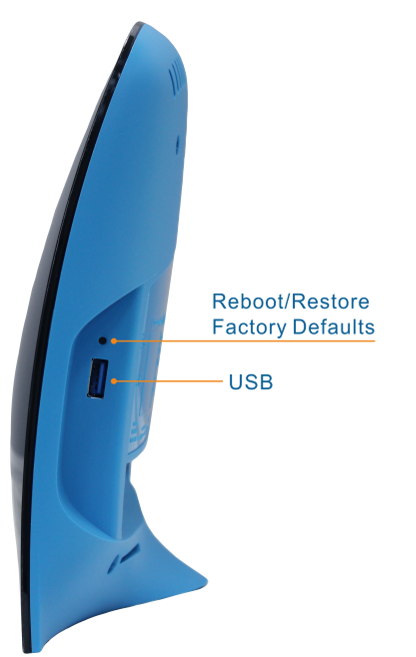
If you still cannot access the Router, please reset the router connection, with a pointed device (Example: a stick, a pin). You should insert it in the small left side hole of the equipment, pressing it for a few seconds.
As the image below:
In order to help you, please access the internal page of the Router using the RJ45 (Ehernet) cable.
To access the internal page you must go to the IP: 192.168.1.1, using the following authentication data:
Username: home
Passward: zonnet
Access must be done by computer with an Ethernet connection (RJ45 cable) to the Router.
If you still cannot access the Router, please reset the router connection, with a pointed device (Example: a stick, a pin). You should insert it in the small left side hole of the equipment, pressing it for a few seconds.
As the image below:
Enter your E-mail address. We'll send you an e-mail with instructions to reset your password.